Create a Deposit Detail Report for all or individual Bank accounts for a specific date or date range.
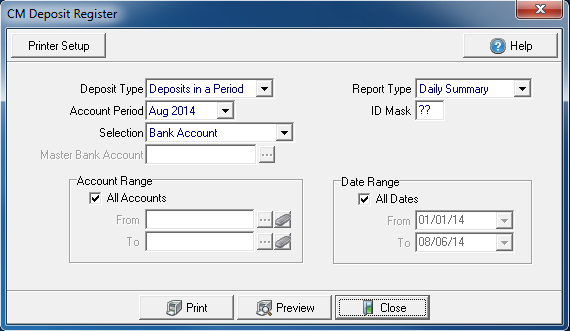
Select a Deposit Type of either
Accounting Period will default to the current period if Deposits in a Period selected. Select the drop down menu to select an alternate period.
Use the Selection drop down menu and choose
- Bank Account
- Master Bank Account
The Master Bank Account field is active if Master Bank Account is chosen in the Selection field. Enter the Bank account number or select  to search.
Choose a Report Type from the drop down menu of either
- Daily Summary
- Deposit Summary
- Detail
ID Mark is used to indicate a Deposit ID or Retain ?? to include all ID Marks.
All Accounts selected by default in Account Range. Remove the check mark and create a range of accounts.
- From- Enter a starting account or select the account using to search.
- To- Enter an ending account or select the account using to search.
In Date Range, all Dates are selected by default. Remove the checkmark and create a Date range.
- From- Enter a start date or select the date from the drop down calendar.
- To- Enter an end date or select the date from the drop down calendar.
Select Preview to view the report onscreen.
Select Print to send the report directly to the default printer.
View a sample report here.